
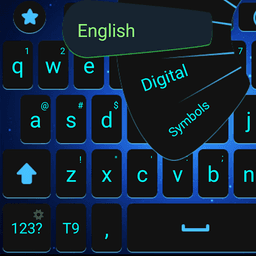
Screenshots
About Fast typing keyboard
Fast typing keyboard delivers rapid, responsive typing built for speed and accuracy. Tap or swipe across a sleek, modern interface designed to make every keystroke feel effortless.
Customize your typing experience with adjustable colors and fonts that match your personal style. The keyboard responds instantly to your input, minimizing lag and keeping your rhythm flowing whether you're composing messages, emails, or notes.
Type across multiple languages and access a full emoji library without breaking stride. Privacy is built in — your typing data remains on your device, never sent elsewhere. Fast typing keyboard combines visual polish with straightforward functionality, so you spend less time fighting your keyboard and more time communicating.
Pros & Cons
Pros
- Instant, lag-free response to typing input keeps your rhythm uninterrupted
- Customizable colors and fonts let you personalize the keyboard appearance
- Multi-language support and full emoji library built directly into the keyboard
- Typing data stays on your device and is never transmitted elsewhere
Cons
- No mention of cloud sync, so custom settings won't transfer between devices
- Third-party keyboard apps may drain battery with continuous background processing
- Limited information about autocorrect accuracy or word prediction quality
- Swipe-typing feature adds complexity for users who prefer traditional tap input
Related Apps

AlienGUIse
Desktop themes and manager for Windows — transform your system with 5 futuristic designs.

SharpKeys
Remap keyboard keys to launch apps, media controls, and custom commands on Windows.

RocketDock
Desktop launcher for Windows — quick access dock with customizable icons and positioning.

Custom Resolution Utility (CRU)
Display resolution utility: Create custom resolutions for your monitor with precise refresh rate control.

Lagguy Wallpapers
Lagguy
4K & HD wallpapers for Android — minimal, abstract, nature, AMOLED designs with lifetime access

Lock Screen OS
Apps Genz
Customize your lock screen with widgets, photos, and notifications. Replace Android's default lock screen.
Latest Articles
Best Adobe Audition alternatives for desktop in 2026 (7 tested)
Jul 10, 2026
Best AI computer-use agent apps for desktop in 2026 (we tested 7)
Jul 10, 2026
Best apps for a fresh Linux install in 2026 (7 picks the first hour)
Jul 10, 2026
Best apps for AI coding agent sandboxing on desktop in 2026 (we tested 7)
Jul 10, 2026
Best apps for Copilot+ PC NPU acceleration in 2026 (8 tested)
Jul 10, 2026